SAML
SAML integration provides:
- Authentication using corporate identities.
- Role-based feature accessibility (
authorizedActions). - Role-based traffic visibility (KFL filter applied to every query).
The roles map and rolesClaim are shared with OIDC — see the OIDC page for the same configuration applied against an OIDC identity provider.
SAML Configuration Clause
auth:
  enabled: true
  type: saml
  # SAML attribute carrying the user's role memberships.
  # In the example IdP below this is named "users-roles"; it can be any
  # attribute name the IdP exposes.
  rolesClaim: role
  # Optional: name of a role inside `roles` applied when an authenticated
  # user has no matching role in their assertion. Empty = no fallback.
  defaultRole: ""
  roles:
    admin:
      # Comma-separated namespace list controlling traffic visibility:
      #   ""        — deny all
      #   "*"       — every namespace
      #   "foo"     — single literal namespace
      #   "foo,bar" — OR over literals
      #   "foo-*"   — glob expansion against the cluster's known namespaces
      namespaces: "*"
      canDownloadPCAP: true
      canUseScripting: true
      scriptingPermissions:
        canSave: true
        canActivate: true
        canDelete: true
      canUpdateTargetedPods: true
      canStopTrafficCapturing: true
      canControlDissection: true
      showAdminConsoleLink: true
  saml:
    idpMetadataUrl: ""
    x509crt: ""
    x509key: ""
Breaking changes since the unified-roles rollout:
- Legacy
auth.saml.rolesandauth.saml.roleAttributeare no longer read — move their values to the top-levelauth.rolesandauth.rolesClaim.- Empty/unset
auth.rolesno longer grants all permissions; admins relying on that behaviour must either populateauth.rolesexplicitly or setauth.defaultRole.- Per-role
filter(raw KFL string) was replaced withnamespaces(comma list, see below). Configs carryingfilter:are ignored at unmarshal — migrate tonamespaces:.auth.defaultFilteris removed. The deny-default semantic moves into per-rolenamespaces: ""; opt out for admin roles withnamespaces: "*".
Login Behavior
Kubeshark sends ForceAuthn=true on every SAML AuthnRequest, forcing the IdP to re-prompt for credentials on each login. After logging out of Kubeshark, the IdP will not silently re-authenticate the user from a leftover SSO session cookie — operators can pick a different user without clearing browser state. This does not affect the IdP session for other applications in the same org.
X.509 Certificate & Key
openssl genrsa -out mykey.key 2048
openssl req -new -key mykey.key -out mycsr.csr
openssl x509 -signkey mykey.key -in mycsr.csr -req -days 365 -out mycert.crtmycert.crt— use fortap.auth.saml.x509crt.mykey.key— use fortap.auth.saml.x509key.
IdP Authorization Configuration
auth.rolesClaim should match the name of the SAML attribute set in the App Metadata (app_metadata) section of the IdP — e.g. role, roles, or any attribute name the IdP emits. The value can be a single text value or an array of values (multi-role users).
For example, in Auth0 it looks like this:
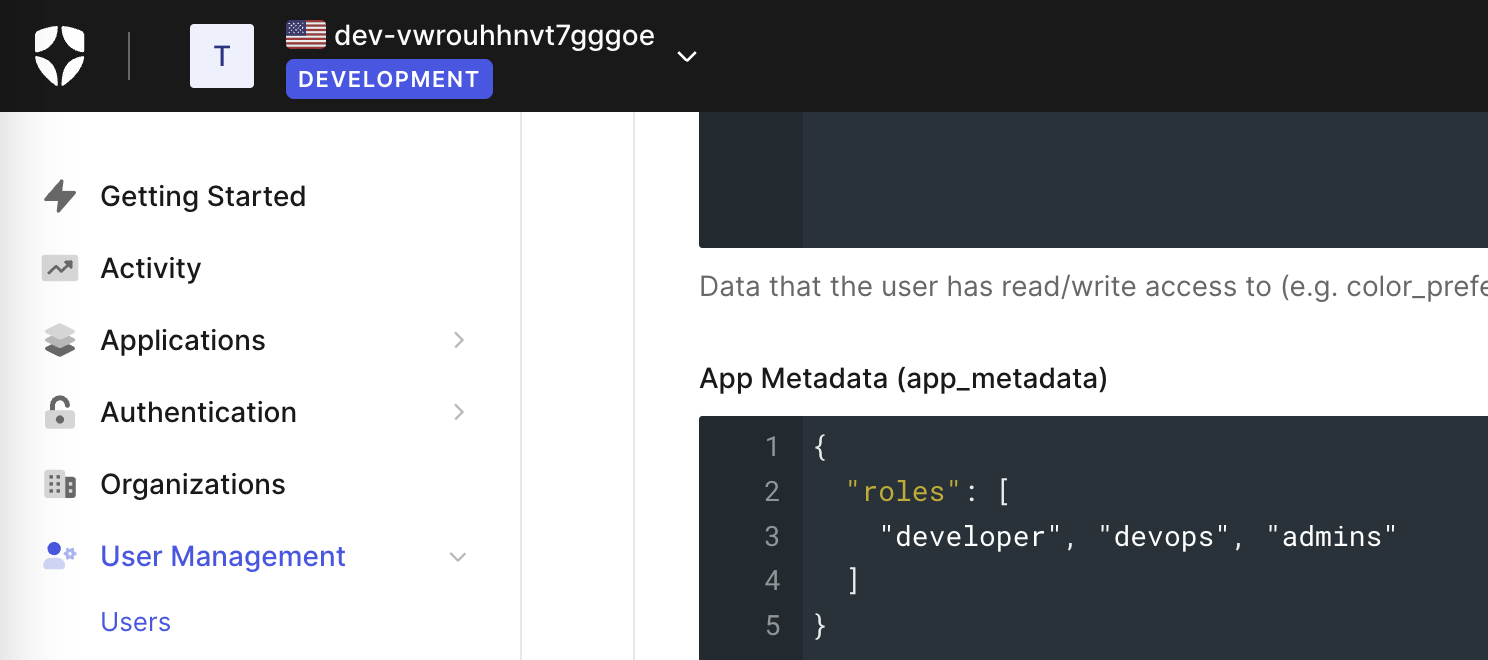
Each role key inside auth.roles is matched against the values returned in this attribute.
Namespace Authorization Rules
Each role specifies a namespaces list that limits the Kubernetes namespaces whose traffic is visible to users in that role. The hub expands the list internally into a KFL filter (src.pod.namespace.name=="…" || dst.pod.namespace.name=="…") AND-ed onto every query and stream. Enforcement covers all hub data paths: REST queries, the legacy /ws stream, and the Connect-RPC streaming endpoints used by the dashboard.
| Value | Effect |
|---|---|
"" (unset) | Deny all — explicit deny-default for the role. |
"*" | Every namespace; no scope filter applied. |
"foo" | Only the literal namespace foo (src or dst). |
"foo,bar" | OR over literal namespaces; whitespace tolerated. |
"foo-*" | Glob expansion against the cluster’s currently-watched namespaces (e.g. payments-api, payments-db). Re-evaluated at each role-resolve, so newly-deployed namespaces matching the pattern become visible at the next sign-in / token refresh. |
"a, b, c-*" | Mix of literals and globs in the same list. |
Users assigned to multiple roles see the union of every role’s namespaces (logical OR). A role with namespaces: "*" lifts every restriction the user would otherwise carry from another role.
Feature Authorization Rules
Each role’s flags map to UI / API actions:
| Flag | Gates |
|---|---|
canDownloadPCAP | PCAP download endpoints (/pcaps/download/...). |
canUseScripting | Reading scripts (GET /scripts). |
scriptingPermissions.canSave | POST / PUT /scripts. |
scriptingPermissions.canActivate | Activate/deactivate scripts (/scripts/:index/activate). |
scriptingPermissions.canDelete | Delete scripts (DELETE /scripts/...). |
canUpdateTargetedPods | Pod targeting endpoints (/pods/target/...). |
canStopTrafficCapturing / canControlDissection | Dissection controls (POST /settings/dissection). |
showAdminConsoleLink | Frontend gate for the admin console link. |
Behaviour when the SAML session can’t be resolved
If the hub fails to resolve a SAML session for a request — service provider not initialized, session cookie missing or expired, claims malformed, or the session-stored authzActions block is missing — both action-level and data-level RBAC fail closed:
authorizedActionsis set to a deny-all (zero-value) action set, so every gated UI action returns 403.authzFiltersis published as an explicit deny-all KFL clause (1==0). The data path AND-s this into every query, so REST results, the legacy WebSocket stream, and Connect-RPC dashboard streams all return empty for the failed request, not “everything in the cluster.”
This closes a previous gap where a partially-broken SAML session would deny actions but leave the data path wide open. If you see “no permission” alerts paired with an empty entries list, inspect /whoami first — authenticated: false (or an authType: saml response with no user) usually points at the SAML session, not the role config.
Example
auth:
  enabled: true
  type: saml
  rolesClaim: users-roles
  defaultRole: ""
  roles:
    developers:
      namespaces: "ks-load"
      canDownloadPCAP: false
      canUseScripting: false
      scriptingPermissions:
        canSave: false
        canActivate: false
        canDelete: false
      canUpdateTargetedPods: false
    devops:
      namespaces: "default"
      canDownloadPCAP: true
      canUseScripting: true
      scriptingPermissions:
        canSave: true
        canActivate: true
        canDelete: true
      canUpdateTargetedPods: false
    admins:
      namespaces: "*"
      canDownloadPCAP: true
      canUseScripting: true
      scriptingPermissions:
        canSave: true
        canActivate: true
        canDelete: true
      canUpdateTargetedPods: true
      canStopTrafficCapturing: true
      canControlDissection: true
      showAdminConsoleLink: true
  saml:
    idpMetadataUrl: https://dev-....us.auth0.com/samlp/metadata/9K...pO
    x509crt: |
      -----BEGIN CERTIFICATE-----
      MIIDgzCCAmsCFDtG4VpACGCxV9cAsa6Z+9dA3suWMA0GCSqGSIb3DQEBCwUAMH4x
      ...
      -----END CERTIFICATE-----
    x509key: |
      -----BEGIN PRIVATE KEY-----
      MIIEvQIBADANBgkqhkiG9w0BAQEFAASCBKcwggSjAgEAAoIBAQCW6rSxwgOW5ZvY
      ...
      -----END PRIVATE KEY-----
A user with the app_metadata below:
{
  users-roles: [ "devops", "developers" ]
}
…sees traffic in both the ks-load and default namespaces and gets the devops action set (everything except canUpdateTargetedPods/dissection control). Only users with the admins role can change pod targeting or dissection settings.
Verifying the active role with /whoami
GET /whoami returns the authenticated user’s identity, resolved authorizedActions, and merged authzFilters. Useful for diagnosing “why don’t I have access to X?” — the response shows exactly which roles the IdP returned (user.roles), which keys actually matched auth.roles (user.effectiveRoles), and the resulting permissions.
The same data is surfaced in the dashboard as the Identity & Access modal — click your name in the top-right to open it. The modal shows the authenticated identity, claimed vs. effective roles, the per-action flag table, and the per-role namespace scope side-by-side, so non-admins can self-diagnose access without curl-ing /whoami directly.